
FIRE TV REMOTE APP FOR IPHONE
The Fire TV Remote App Built for iPhone.
Remote for Fire TV turns your iPhone into a full Fire TV remote over your home Wi-Fi. Clear the single iOS Local Network prompt, type the four digits your TV shows, and every button is on screen — with no background service to babysit.
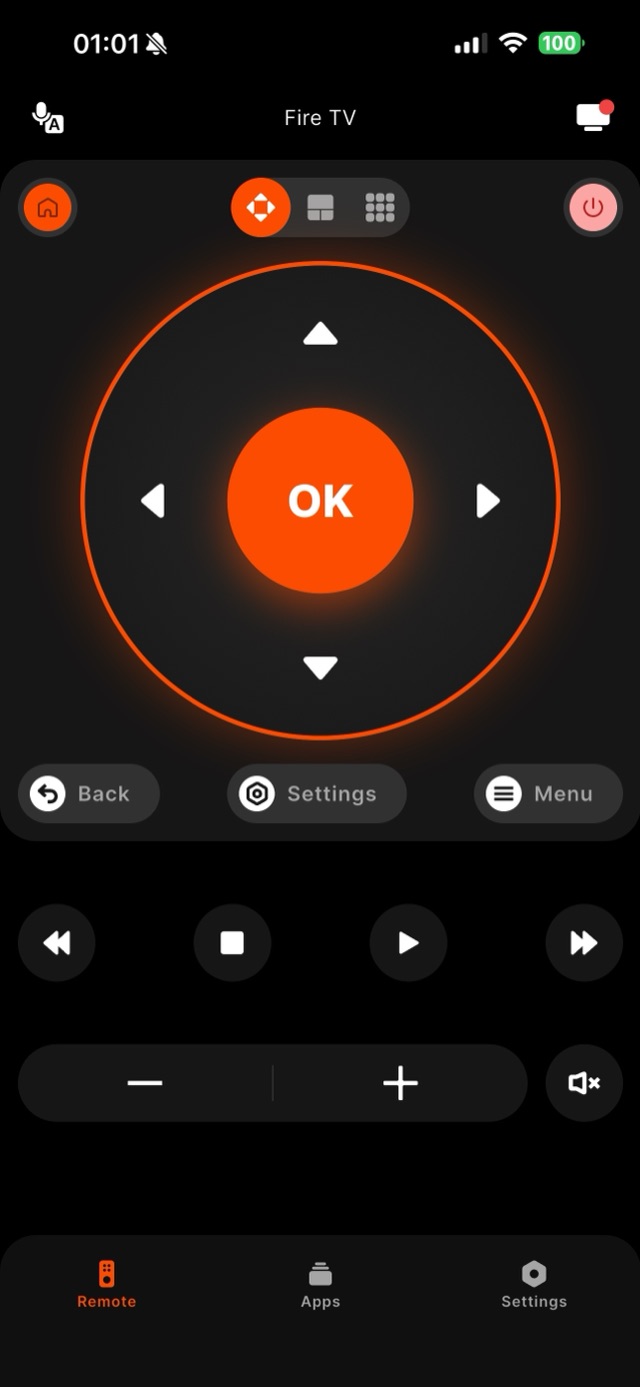
On iPhone the whole experience turns on one permission. The moment Remote for Fire TV starts looking for your Fire TV, iOS raises the Local Network prompt — Apple treats any app that talks to devices on your own Wi-Fi as sensitive, and it asks exactly once. Tap Allow and your Fire TV Stick, Stick 4K Max or Fire TV Cube appears in the list within a couple of seconds. Tap Don’t Allow and every later scan comes back empty with nothing on screen to explain why, because iOS does not report the block back to the app. The repair is Settings, then Privacy and Security, then Local Network, where you switch Remote for Fire TV on again; on some iPhones the change only takes hold after the phone is restarted, which is why the app spells that out on its connect screen instead of leaving you guessing. The second iOS-only detail is smaller but confuses people. iOS keeps the name of the Wi-Fi network you are joined to behind Location permission, so the app asks for Location While Using the App for exactly one purpose: printing that network name beside the device list, where a mismatch is obvious at a glance. It never requests the Always variant and never reads location in the background — decline it and discovery is unaffected. Backgrounding behaves the way iOS users expect, too: leave the app and iOS suspends it, closing the local session, then reopen it and the stored pairing brings your Fire TV straight back without a second code. From there it is the ordinary Fire TV flow — four digits on the television, typed once.
How it works
Works with your Fire TV over Wi-Fi.
Remote for Fire TV connects to your Fire TV over your home Wi-Fi. The first time, you enter a four-digit code shown on the TV — after that it reconnects on its own. No account, and everything stays on your local network.
- Connection
- Your home Wi-Fi
- Pairing
- One-time 4-digit code shown on the TV
- Account
- Not required
- Privacy
- Remote control stays on your local network
- Works with
- Fire TV Stick Lite & Stick HD, Stick 4K & 4K Max, Fire TV Cube, and Fire TV built-in Smart TVs (Toshiba, Insignia, Pioneer); iPhone and iPad
Step by step
How to fix it: Fire TV Remote App for iPhone.
Each step takes seconds. No account needed — most take nothing more than your phone and the code shown on the TV.
-
Install it and allow Local Network
Open Remote for Fire TV on your iPhone. The first scan triggers the iOS Local Network prompt — tap Allow. If you dismissed it by accident, turn it back on under Settings, Privacy and Security, Local Network.
-
Check the network name iOS shows you
The connect screen prints the Wi-Fi name your iPhone is joined to. Confirm it matches the network the Fire TV uses, and stay off guest profiles, which keep devices from seeing each other.
-
Pair once with the four digits on the TV
Tap your Fire TV in the list. The television displays four digits; type them into the app. iOS keeps that pairing with the app, so later launches connect without asking again.
-
Reopen after backgrounding
Leaving the app suspends it and closes the live session — normal iOS behaviour. Reopen Remote for Fire TV and it finds the same Fire TV and reconnects on its own, with nothing to keep alive in the background.
-
If the list stays empty, restart the iPhone
A Local Network toggle occasionally needs a reboot before iOS honours it. Restart the phone, reopen the app, and the Fire TV should appear — this is the fix for the empty-list case, not a reinstall.
Common questions
Fire TV Remote App for iPhone — your questions answered.
Why can't the iPhone app see my Fire TV when both are on the same Wi-Fi?
Why does an iPhone remote app ask for Location permission?
Does the connection drop when I switch apps or lock the iPhone?
Can I mirror my iPhone screen to the Firestick with this app?
Does it run on iPad, and does the iPad need its own pairing?
Free download
Take control of your Fire TV in seconds.
Remote for Fire TV replaces the remote over Wi-Fi the moment your phone joins the same network. Enter the one-time code shown on your TV and you are in — no account, no original remote needed.


An independent app by Auxility, Inc. Not affiliated with, endorsed by, or sponsored by Amazon. Amazon, Fire TV and Firestick are trademarks of Amazon.com, Inc., used only to indicate device compatibility.
Keep exploring
Other Fire TV Troubleshooting Guides
- Lost Firestick Remote lost firestick remote
- Fire TV Remote Not Working fire tv remote not working
- Firestick Remote Replacement fire tv remote replacement
- Fire TV Remote App for Android fire tv remote app android
- Pair a Firestick Remote pair firestick remote
- Firestick Remote Blinking firestick remote blinking
- Connect Firestick to Wi-Fi connect firestick to wifi
- Fire TV Volume Not Working fire tv volume not working
- Free Fire TV Remote App free fire tv remote app