
FIRE TV VOLUME NOT WORKING
Fire TV Volume Not Working? Use Your Phone's Buttons.
When the remote's volume rocker stops responding, Remote for Fire TV sends volume up, down, and mute to your Fire TV over Wi-Fi — with a quick note on how Stick and Cube handle sound differently.
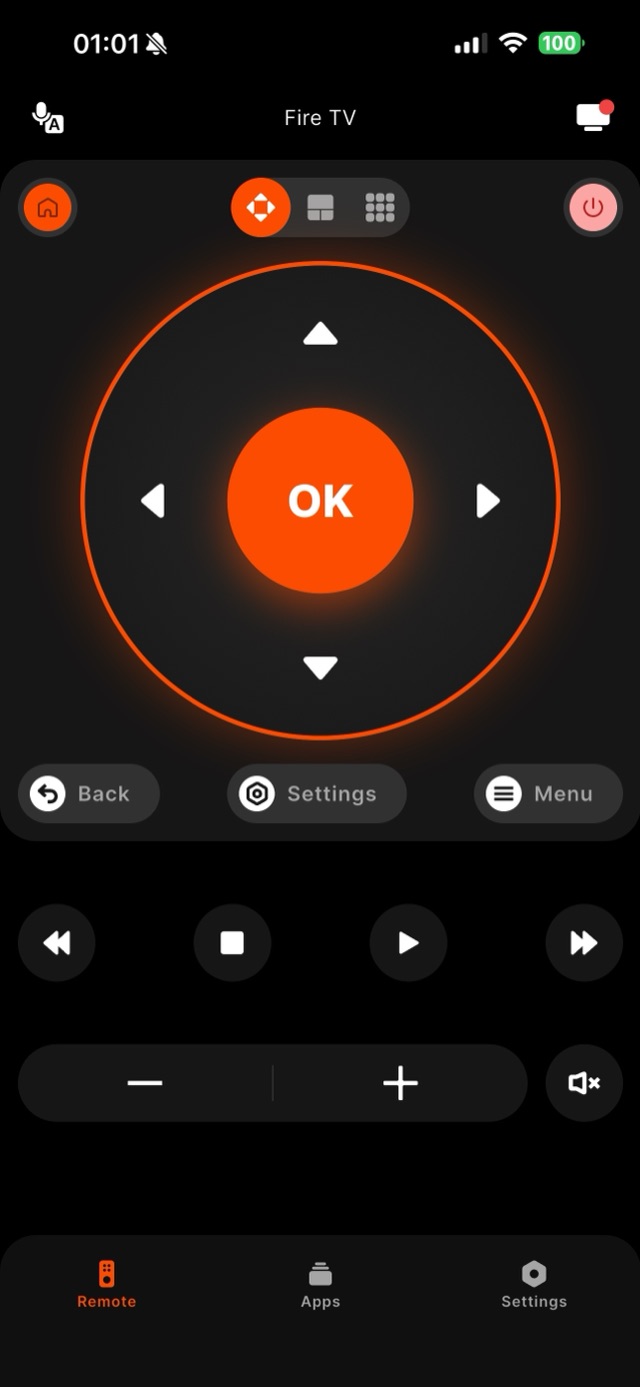
Volume on Fire TV is slightly different from the rest of the buttons, which is why it is often the first thing to act up. The remote's volume and mute control your TV or soundbar, and how that signal reaches the speakers depends on your setup — a Fire TV Cube can talk to many TVs directly, while a Fire TV Stick relies on its remote for TV volume. If the physical remote's volume has stopped working, Remote for Fire TV gives you on-screen volume up, volume down, and mute that send over Wi-Fi to devices that accept network volume. It is honest to say results depend on your hardware: where your setup supports network volume control, the app's buttons work; where a TV only accepts its own control signal, you may still adjust the TV directly. Either way, the app restores navigation and mute immediately so a stuck volume rocker never leaves you stranded.
How it works
Works with your Fire TV over Wi-Fi.
Remote for Fire TV connects to your Fire TV over your home Wi-Fi. The first time, you enter a four-digit code shown on the TV — after that it reconnects on its own. No account, and everything stays on your local network.
- Connection
- Your home Wi-Fi
- Pairing
- One-time 4-digit code shown on the TV
- Account
- Not required
- Privacy
- Remote control stays on your local network
- Works with
- Fire TV Stick, Fire TV Stick 4K & 4K Max, Fire TV Cube, and Fire TV built-in Smart TVs (Insignia, Toshiba, Amazon Omni)
Step by step
How to fix it: Fire TV Volume Not Working.
Each step takes seconds. No account needed — most take nothing more than your phone and the code shown on the TV.
-
Check what the volume controls
Fire TV volume adjusts your TV or soundbar, not the Stick itself. Confirm whether the TV responds to any control at all before blaming the remote.
-
Connect Remote for Fire TV over Wi-Fi
Join the same network, open the app, select your Fire TV, and enter the four-digit code shown on the TV the first time.
-
Use the on-screen volume row
Tap volume up, volume down, or mute in the app. On setups that accept network volume, the level changes just like the hardware rocker.
-
Fall back to TV controls if needed
If your TV only takes its own signal, use the TV's buttons for level while the app handles navigation, playback, and mute.
Common questions
Fire TV Volume Not Working — your questions answered.
Why has the volume on my Fire TV remote stopped working?
Does the app control volume on both Fire TV Stick and Cube?
Can I at least mute the TV from my phone?
Which Fire TV remotes even have volume buttons?
Can HDMI-CEC bring volume control back?
Free download
Take control of your Fire TV in seconds.
Remote for Fire TV replaces the remote over Wi-Fi the moment your phone joins the same network. Enter the one-time code shown on your TV and you are in — no account, no original remote needed.


An independent app by Auxility, Inc. Not affiliated with, endorsed by, or sponsored by Amazon. Amazon, Fire TV and Firestick are trademarks of Amazon.com, Inc., used only to indicate device compatibility.
Keep exploring
Other Fire TV Troubleshooting Guides
- Lost Firestick Remote lost firestick remote
- Fire TV Remote Not Working fire tv remote not working
- Firestick Remote Replacement fire tv remote replacement
- Fire TV Remote App for iPhone fire tv remote app iphone
- Fire TV Remote App for Android fire tv remote app android
- Pair a Firestick Remote pair firestick remote
- Firestick Remote Blinking firestick remote blinking
- Connect Firestick to Wi-Fi connect firestick to wifi
- Free Fire TV Remote App free fire tv remote app