
LOST FIRESTICK REMOTE
Lost Your Firestick Remote? Your Phone Is the Fix.
A misplaced remote does not mean a dead TV. Remote for Fire TV finds your Fire TV on Wi-Fi and brings back every button in a few taps — the connection code shows up right on the screen.
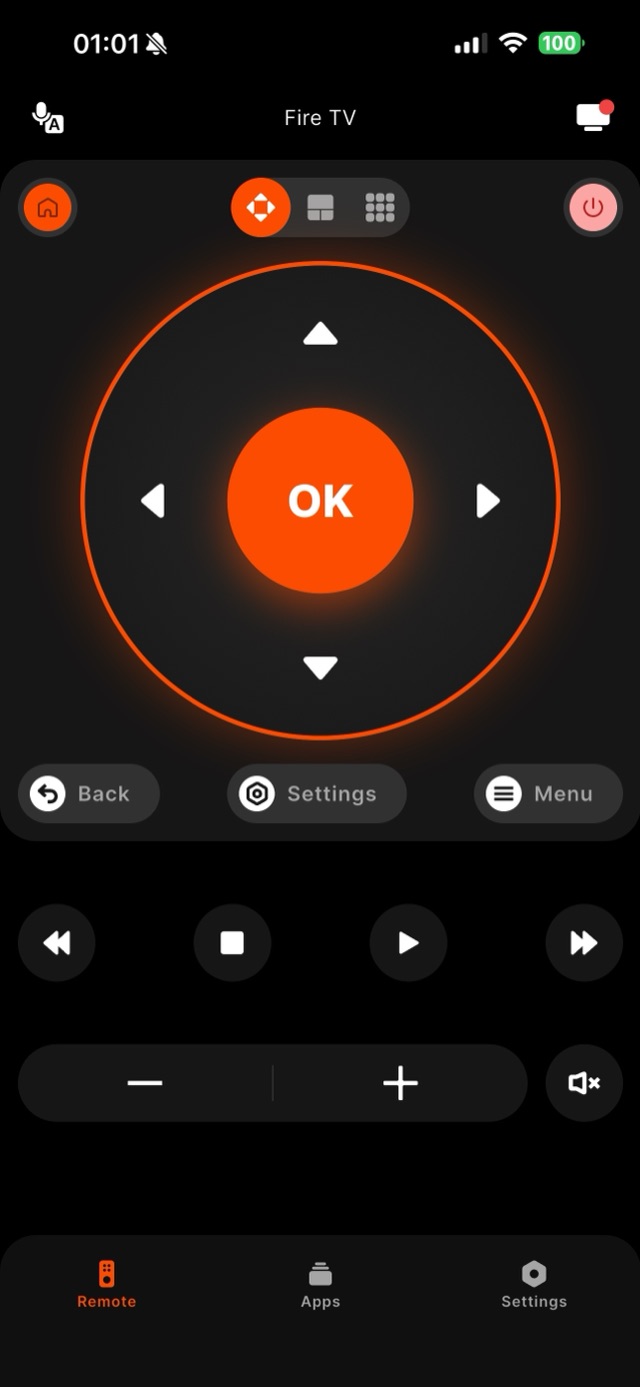
Losing the little Fire TV Stick remote is easy — it slips into couch cushions and vanishes. The good news is that your Fire TV Stick, 4K Max, or Fire TV Cube stays reachable on your home Wi-Fi even when the physical remote is gone. Remote for Fire TV connects over that same network and rebuilds the whole control surface on your phone: the D-Pad, OK, Home, Back, Menu, playback, and volume. The first time you connect, your Fire TV shows a four-digit code on the TV screen — you read it off the screen and type it into the app, so you can pair the app without ever touching the missing remote. After that first pairing the app remembers your TV and reconnects on its own.
How it works
Works with your Fire TV over Wi-Fi.
Remote for Fire TV connects to your Fire TV over your home Wi-Fi. The first time, you enter a four-digit code shown on the TV — after that it reconnects on its own. No account, and everything stays on your local network.
- Connection
- Your home Wi-Fi
- Pairing
- One-time 4-digit code shown on the TV
- Account
- Not required
- Privacy
- Remote control stays on your local network
- Works with
- Fire TV Stick, Fire TV Stick 4K & 4K Max, Fire TV Cube, and Fire TV built-in Smart TVs (Toshiba, Insignia, Amazon Omni, Pioneer)
Step by step
How to fix it: Lost Firestick Remote.
Each step takes seconds. No account needed — most take nothing more than your phone and the code shown on the TV.
-
Join the same Wi-Fi
Connect your phone to the exact Wi-Fi network your Fire TV already uses. Control runs over your local network, so both devices must share one router.
-
Open Remote for Fire TV and scan
Launch the app. It scans the network and lists every Fire TV it finds — usually your Living Room Fire TV appears within a couple of seconds.
-
Read the code off the TV
Tap your device. Your Fire TV displays a four-digit code on the screen; type it into the app once. Because the code is shown on the TV, you never need the lost remote to complete pairing.
-
Control with the full D-Pad
The on-screen D-Pad, OK, Home, Back, Menu, playback, volume, and mute go live. Everything the lost hardware remote did, your phone now does.
Common questions
Lost Firestick Remote — your questions answered.
Can I set up Remote for Fire TV if I have completely lost the Firestick remote?
Do I need the original remote to pair the app the first time?
I lost the remote AND the Firestick is not connected to Wi-Fi — is it hopeless?
Can Alexa make my lost Fire TV remote beep?
My Fire TV went to sleep while the remote was missing — can the app still wake it?
Free download
Take control of your Fire TV in seconds.
Remote for Fire TV replaces the remote over Wi-Fi the moment your phone joins the same network. Enter the one-time code shown on your TV and you are in — no account, no original remote needed.


An independent app by Auxility, Inc. Not affiliated with, endorsed by, or sponsored by Amazon. Amazon, Fire TV and Firestick are trademarks of Amazon.com, Inc., used only to indicate device compatibility.
Keep exploring
Other Fire TV Troubleshooting Guides
- Fire TV Remote Not Working fire tv remote not working
- Firestick Remote Replacement fire tv remote replacement
- Fire TV Remote App for iPhone fire tv remote app iphone
- Fire TV Remote App for Android fire tv remote app android
- Pair a Firestick Remote pair firestick remote
- Firestick Remote Blinking firestick remote blinking
- Connect Firestick to Wi-Fi connect firestick to wifi
- Fire TV Volume Not Working fire tv volume not working
- Free Fire TV Remote App free fire tv remote app