
FIRESTICK REMOTE REPLACEMENT
Fire TV Remote Replacement, Free and Instant.
Before you pay for a new Amazon remote and wait days for delivery, replace it right now. Remote for Fire TV gives you every button on your phone over Wi-Fi — and keeps working after the new one arrives.
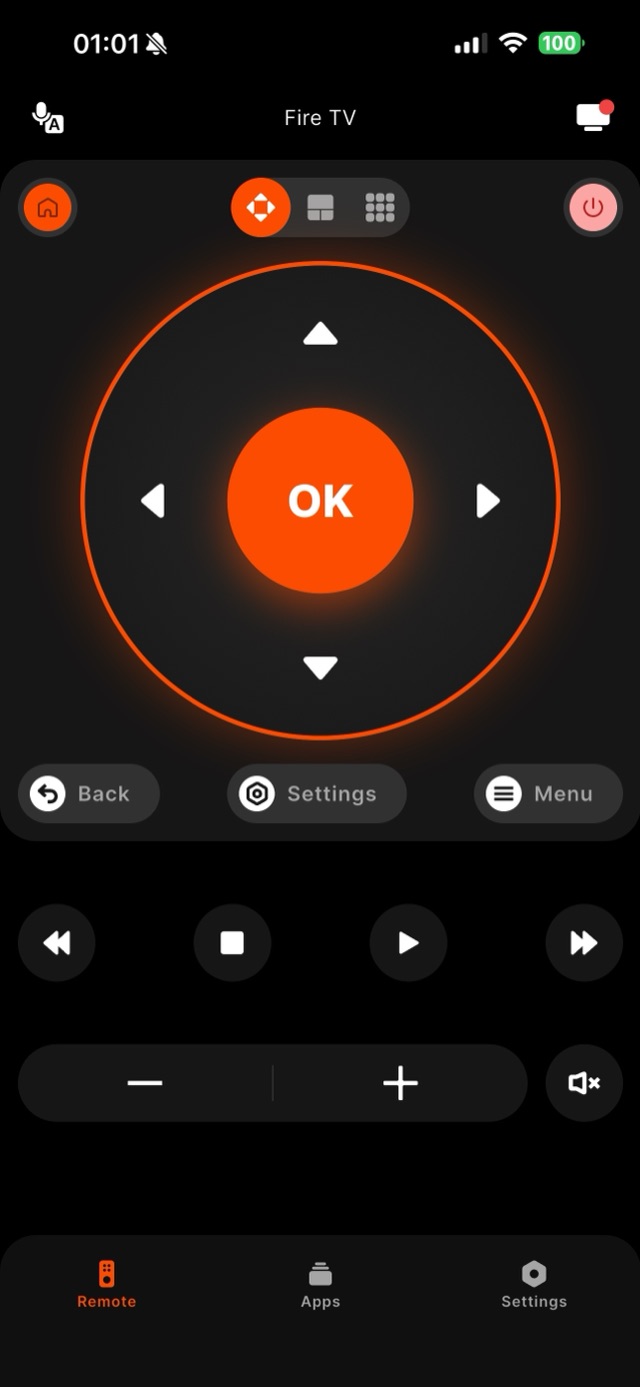
When a Fire TV remote is lost or broken, the obvious move is to buy an official Amazon replacement — but that costs money and takes days to arrive, leaving your TV stranded in the meantime. A free app replaces the remote instantly. Remote for Fire TV discovers your Fire TV Stick, 4K Max, or Fire TV Cube on Wi-Fi and puts the full control layout on your phone: D-Pad, OK, Home, Back, Menu, playback, volume, and mute. Many people never bother ordering a hardware remote at all once they realize the phone does everything, including on-screen typing for search, which the plastic remote cannot do. If you do buy a replacement, the app still lives alongside it as a backup that never runs out of batteries or slips down the couch.
How it works
Works with your Fire TV over Wi-Fi.
Remote for Fire TV connects to your Fire TV over your home Wi-Fi. The first time, you enter a four-digit code shown on the TV — after that it reconnects on its own. No account, and everything stays on your local network.
- Connection
- Your home Wi-Fi
- Pairing
- One-time 4-digit code shown on the TV
- Account
- Not required
- Privacy
- Remote control stays on your local network
- Works with
- Fire TV Stick, Fire TV Stick 4K & 4K Max, Fire TV Cube, and Fire TV built-in Smart TVs (Insignia, Toshiba, Amazon Omni)
Step by step
How to fix it: Firestick Remote Replacement.
Each step takes seconds. No account needed — most take nothing more than your phone and the code shown on the TV.
-
Install the app instead of ordering
Download Remote for Fire TV on your phone. There is nothing to ship and nothing to wait for — you can be watching again in minutes.
-
Connect over Wi-Fi
Join the same network as your Fire TV, open the app, select your device, and enter the four-digit code shown on the TV the first time.
-
Use the full remote layout
You get the D-Pad, OK, Home, Back, playback, volume, and app-launch shortcuts — plus phone-keyboard typing for search that hardware remotes lack.
-
Keep it as a permanent backup
Even if a new hardware remote arrives later, the app stays paired as a second remote that never needs batteries.
Common questions
Firestick Remote Replacement — your questions answered.
Is Remote for Fire TV a real replacement for the Fire TV remote?
Do I still need to buy an official Amazon remote?
Will one app replace remotes for more than one Fire TV?
Is there anything the plastic remote still does better than the app?
Do I have to choose between a hardware replacement and the app?
Free download
Take control of your Fire TV in seconds.
Remote for Fire TV replaces the remote over Wi-Fi the moment your phone joins the same network. Enter the one-time code shown on your TV and you are in — no account, no original remote needed.


An independent app by Auxility, Inc. Not affiliated with, endorsed by, or sponsored by Amazon. Amazon, Fire TV and Firestick are trademarks of Amazon.com, Inc., used only to indicate device compatibility.
Keep exploring
Other Fire TV Troubleshooting Guides
- Lost Firestick Remote lost firestick remote
- Fire TV Remote Not Working fire tv remote not working
- Fire TV Remote App for iPhone fire tv remote app iphone
- Fire TV Remote App for Android fire tv remote app android
- Pair a Firestick Remote pair firestick remote
- Firestick Remote Blinking firestick remote blinking
- Connect Firestick to Wi-Fi connect firestick to wifi
- Fire TV Volume Not Working fire tv volume not working
- Free Fire TV Remote App free fire tv remote app