
FREE FIRE TV REMOTE APP
A Free Fire TV Remote App — With the Whole Remote.
Remote for Fire TV gives you the full Fire TV control layout for free over Wi-Fi — D-Pad, OK, Home, Back, playback, and volume — with no account and an honest split of what PRO adds.
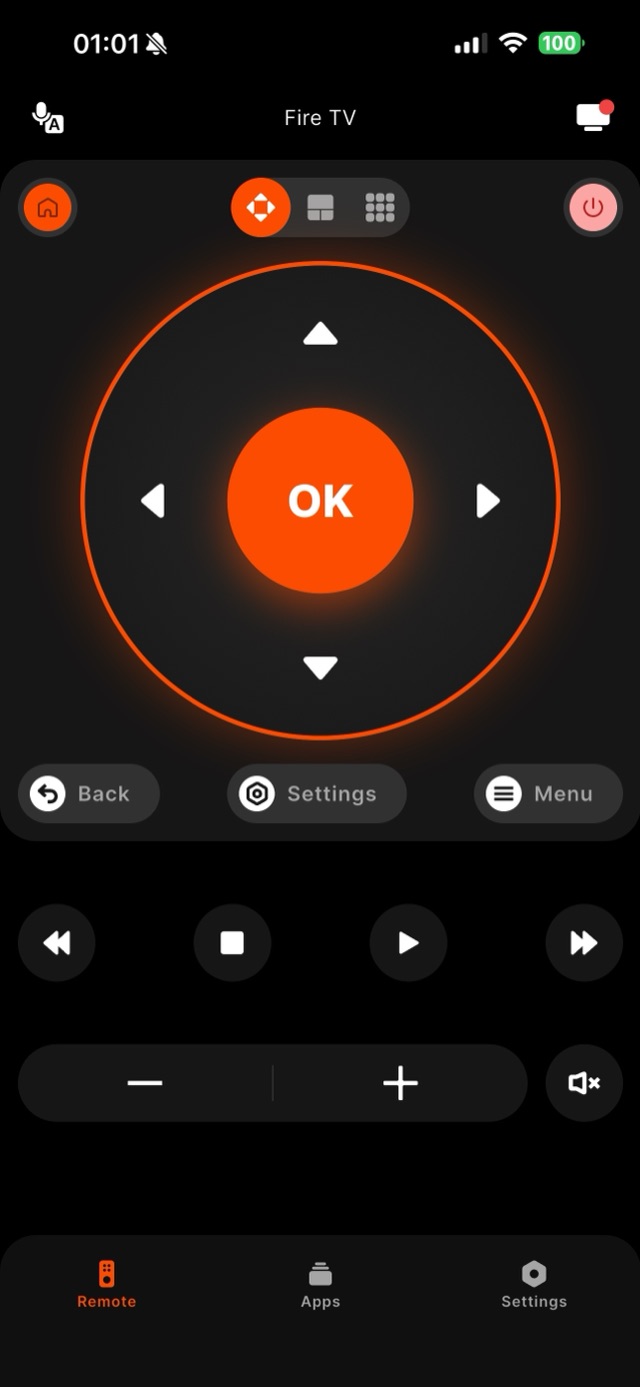
Plenty of "free" remote apps bury the actual buttons behind a paywall. Remote for Fire TV keeps the core remote genuinely free: the D-Pad, OK, Home, Back, Menu, playback, volume, and mute all work without paying, and there is no account to create — control stays on your local Wi-Fi. What the free tier covers is the everyday job of replacing a lost or broken Fire TV remote on a Stick, 4K Max, or Fire TV Cube. A PRO subscription is offered for premium extras on top of that, and it is optional; the app is upfront about the split rather than teasing basics and charging for them. The first time you connect, the Fire TV shows a four-digit code you enter once, and after that the free remote reconnects on its own whenever you open the app.
How it works
Works with your Fire TV over Wi-Fi.
Remote for Fire TV connects to your Fire TV over your home Wi-Fi. The first time, you enter a four-digit code shown on the TV — after that it reconnects on its own. No account, and everything stays on your local network.
- Connection
- Your home Wi-Fi
- Pairing
- One-time 4-digit code shown on the TV
- Account
- Not required
- Privacy
- Remote control stays on your local network
- Works with
- Fire TV Stick, Fire TV Stick 4K & 4K Max, Fire TV Cube, and Fire TV built-in Smart TVs (Toshiba, Insignia, Pioneer)
Step by step
How to fix it: Free Fire TV Remote App.
Each step takes seconds. No account needed — most take nothing more than your phone and the code shown on the TV.
-
Download it free
Install Remote for Fire TV and open it. The core remote is free to use with no account and no sign-up.
-
Connect over your Wi-Fi
Put your phone on the same network as the Fire TV, select your device, and enter the four-digit code the TV shows the first time.
-
Use every core button
The full D-Pad, OK, Home, Back, playback, volume, and mute are all part of the free tier — enough to fully replace a hardware remote.
-
Add PRO only if you want extras
PRO is an optional subscription for premium features. You never need it for everyday control of your Fire TV.
Common questions
Free Fire TV Remote App — your questions answered.
Is Remote for Fire TV really free, or is the remote itself paywalled?
What does the free fire tv remote app include versus PRO?
Does the free version need an account or show intrusive ads?
Are there Fire TV jobs no phone app can do, free or paid?
Does it work on Fire TV built-in televisions as well as Sticks?
Free download
Take control of your Fire TV in seconds.
Remote for Fire TV replaces the remote over Wi-Fi the moment your phone joins the same network. Enter the one-time code shown on your TV and you are in — no account, no original remote needed.


An independent app by Auxility, Inc. Not affiliated with, endorsed by, or sponsored by Amazon. Amazon, Fire TV and Firestick are trademarks of Amazon.com, Inc., used only to indicate device compatibility.
Keep exploring
Other Fire TV Troubleshooting Guides
- Lost Firestick Remote lost firestick remote
- Fire TV Remote Not Working fire tv remote not working
- Firestick Remote Replacement fire tv remote replacement
- Fire TV Remote App for iPhone fire tv remote app iphone
- Fire TV Remote App for Android fire tv remote app android
- Pair a Firestick Remote pair firestick remote
- Firestick Remote Blinking firestick remote blinking
- Connect Firestick to Wi-Fi connect firestick to wifi
- Fire TV Volume Not Working fire tv volume not working